OmniClinic365: run your outpatient clinic from booking to paid invoice on Odoo
OmniClinic365 is a bilingual Arabic and English clinic platform built as Odoo 19 modules for outpatient clinics in Egypt, Saudi Arabia and the UAE. It covers the full visit, from appointment and check-in to the signed encounter, prescription, invoice and payment. It is currently available through early access.
OmniClinic365 gives reception, nurses, doctors, cashiers and managers their own workspace on one shared patient record, so a visit moves from booking to payment without paper or re-entry. Because it is built on Odoo, charges become standard Odoo invoices and payments, and clinic data sits next to your accounting instead of in a separate system.
 Odoo
 Python
 PostgreSQL
The outpatient visit, step by step
This is the workflow implemented in the current release, performed by each role in its own workspace.
Book and confirm
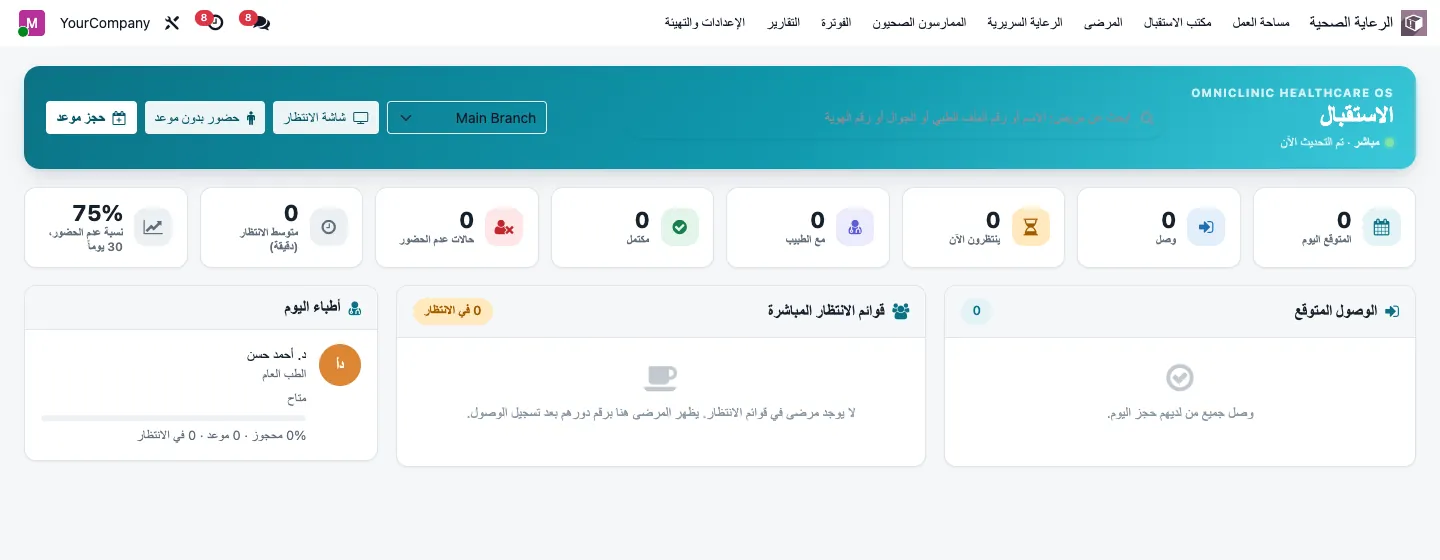
Reception books a free slot; a conflict engine checks the doctor, room, branch, schedule and blocked time.
Check in
The patient checks in and receives a queue token; walk-ins are supported and a waiting-room screen shows the queue.
Nurse triage
The nurse station records vital signs with configurable units and flags values outside the configured ranges.
Doctor encounter
The doctor documents complaint, examination and coded diagnoses, and issues a prescription with an allergy check.
Sign and lock
The signed encounter is locked; later changes are recorded as amendments rather than edits.
Checkout
The consultation is charged automatically and the cashier issues the invoice and records payment, closing the visit.
Modules in the current release
Installed together as one suite, with Arabic and English activated.
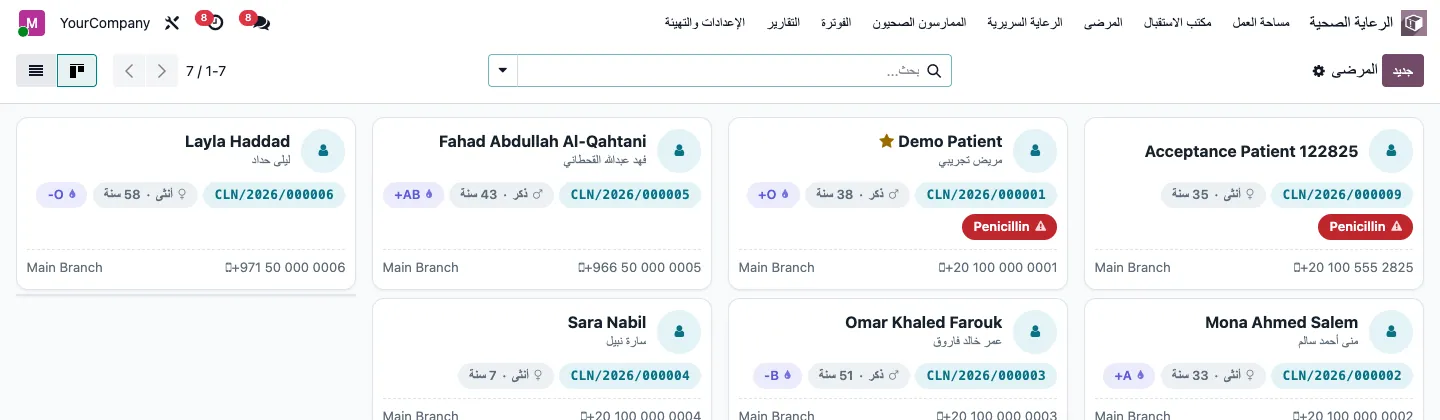
Patient registry
Medical record number per facility, national ID validation per country profile, duplicate detection and an audited merge.
Practitioners and scheduling
Doctor profiles, specialties, licenses with expiry alerts, weekly schedules per branch and recurring appointments.
Clinical record
Encounters, vital signs, coded diagnoses, problem list, chronic conditions, allergies with safety alerts, and a timeline of past visits.
E-prescriptions
Medication profiles on Odoo products, drug-allergy check on issue, and a bilingual A5 print with a QR code.
Billing
Service catalog, charge capture, Odoo invoices and payments at checkout, and a report of services delivered but not charged.
Clinic reporting
Clinic overview, appointment, no-show and doctor analyses, and a bilingual visit summary.
Privacy, access control and audit
Access is defined by role: receptionist, nurse, doctor, cashier and healthcare manager each see the menus and records their job requires. Encounters carry sensitivity levels, and an immutable audit trail records who viewed, created, changed, printed, exported or signed a record, including attempts to unlock signed encounters. Facilities, branches, rooms and departments are configured per organization.
Signing an encounter is an internal attestation that locks the content and records the user; it is not a certified legal e-signature. Data protection obligations differ by country, so hosting, retention and access policies are agreed with each clinic during implementation.
Configuration for your country and setup
Built-in settings that adapt the platform before any customization.
- Country profiles for Egypt, Saudi Arabia, Dubai, Abu Dhabi and the Northern Emirates
- Multiple facilities, branches, rooms, departments and specialties
- Code systems such as ICD-10, LOINC and local codes, with CSV import for licensed releases
- Configurable vital-sign units and ranges
- Arabic right-to-left and English interface and printouts
- Installs on Odoo Community or Enterprise
- With Enterprise: doctor planning and room occupancy timelines, patient retention cohorts and a patient map
What is not included in the current release
The current release focuses on the outpatient visit. Laboratory, radiology, procedures, care plans, consent forms, a patient portal, online booking, insurance eligibility and claims, pharmacy dispensing, and connections to national platforms or FHIR and HL7 interfaces are not part of it. Licensed terminology such as full ICD-10 or SNOMED CT releases is not bundled; clinics load the releases they are licensed to use. We will confirm what is in scope for your clinic in writing before go-live.
Frequently asked questions
Is OmniClinic365 suitable for a single-doctor clinic?
It is designed for outpatient clinics and supports multiple branches, rooms and doctors, but a small clinic can use only the roles it needs. During discovery we check whether the full suite or a lighter setup fits your size.
Does it support insurance companies?
Charges already record a payer share and a patient share, but payer contracts, eligibility checks and claim submission are not part of the current release. Insurance billing can be discussed as a customization during early access.
Can we import our existing patient records?
Yes. Patient migration is part of the implementation. Duplicate detection helps clean the imported data, and any merge is audited so the history of each record stays traceable.
Does it connect to Egyptian e-invoicing or Saudi ZATCA?
Clinic invoices are standard Odoo invoices, so they can follow the e-invoicing setup of your Odoo accounting, such as Egypt ETA or Saudi ZATCA integration where it applies. Requirements depend on your tax registration and must be confirmed with the relevant authority.
Where is patient data hosted?
That is agreed with each clinic. We can deploy on cloud hosting, a dedicated server or your own infrastructure, with SSL, backups and access hardening, according to the data protection rules that apply to you.
Request early access to OmniClinic365
Share how your clinic handles bookings, visits and billing today, and we will walk you through the current release against your workflow.