Omnichannel CRM that keeps every customer conversation in one place
Customers in Egypt and the Gulf reach companies on WhatsApp first, then by phone, email and website forms. When each channel lives on a different phone or inbox, leads are lost and nobody sees the full history. We connect these channels to Odoo CRM so every conversation lands on the customer record.
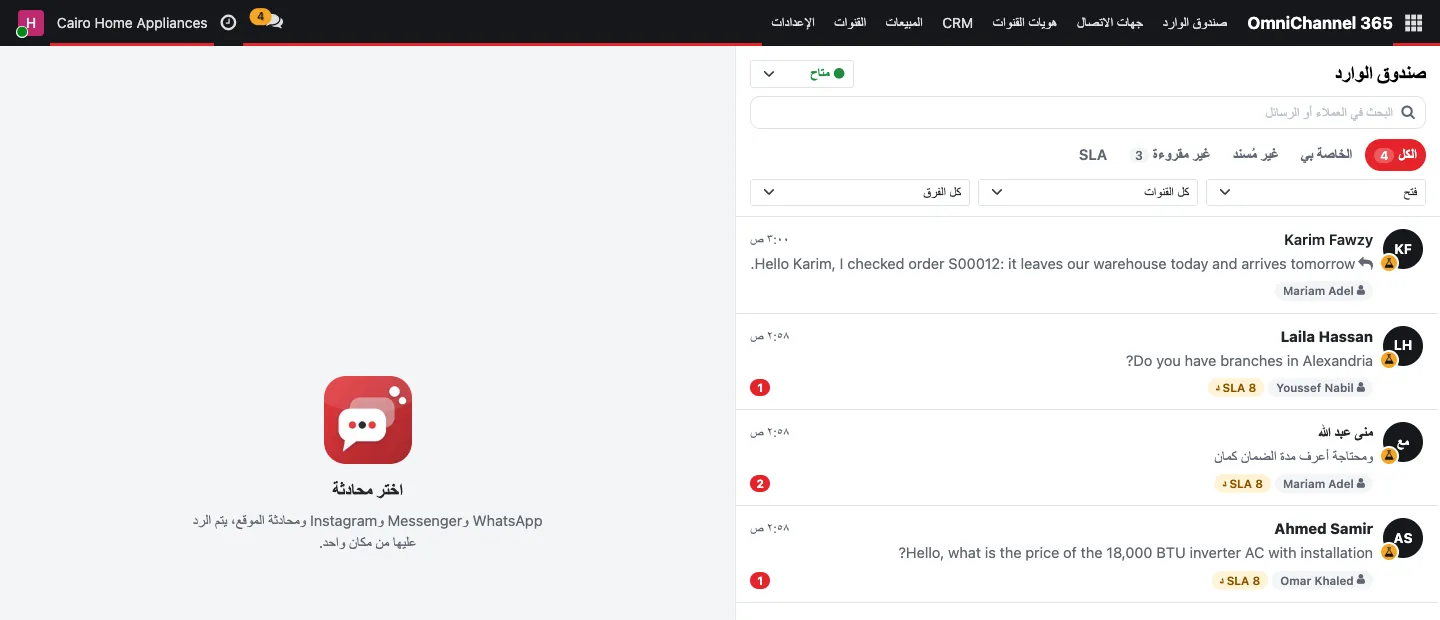
Omnichannel CRM means that WhatsApp messages, calls, emails, live chat and form submissions all create or update the same contact and opportunity, are routed to the right person by rules, and remain visible to the team after the conversation ends. We build this on Odoo CRM with integrations such as WhatsApp Business, Respond.io, 3CX telephony, email servers and website forms, plus assignment rules, follow-up activities and pipeline reports.
 Odoo
 WhatsApp
 Meta
 Python
The cost of scattered conversations
When a salesperson leaves, their WhatsApp chats leave with them. When a customer calls about an order, the agent cannot see the quotation discussed by email last week. Marketing cannot tell which campaign produced which deal, and managers judge the pipeline from verbal updates.
Bringing channels into Odoo turns conversations into company records. The customer timeline shows messages, calls, emails, quotations, orders, invoices and support tickets together, because they all live in the same database.
Channels we connect
Each channel is configured with routing, templates and logging.
WhatsApp Business
Inbound chats create leads; approved templates send confirmations and reminders from Odoo.
Respond.io inbox
A shared inbox across messaging channels with contacts and outcomes synced to Odoo.
3CX telephony
Click-to-call, caller identification and call logs on the contact and opportunity.
Incoming email aliases create leads or tickets; replies stay in the record's chatter.
Website forms and live chat
Contact forms and live chat on Odoo Website feed the CRM with source tracking.
SMS and email marketing
Segmented campaigns and surveys using CRM data, with opt-out handling.
How a conversation becomes a deal
A typical configured flow in Odoo CRM.
Capture
A message, call or form is matched to an existing contact by phone or email, or creates a new lead.
Route
Assignment rules send it to a team or salesperson by region, product line or language.
Follow up
Scheduled activities remind the owner to call, send a quotation or follow up.
Quote and convert
The opportunity becomes a quotation and a sales order with the conversation history attached.
Serve and retain
After-sales questions open helpdesk tickets on the same customer record.
Controls for customer data
Centralizing conversations also means protecting them.
- Access to conversations by team and role
- Company-owned numbers and accounts, not personal phones
- Opt-in and opt-out handling for marketing messages
- Approved WhatsApp templates for outbound messages
- Duplicate contact detection and merge rules
- Retention rules for call recordings where used
Frequently asked questions
Can we use our existing WhatsApp number?
Often yes, but a number used in the regular WhatsApp app must be migrated to the WhatsApp Business Platform, which has its own rules from Meta. We review the options with you, including using a new dedicated number.
Do we need Odoo Enterprise for omnichannel CRM?
Odoo CRM, email and live chat are available in both editions, while some apps such as Odoo's native WhatsApp and VoIP features are Enterprise. With Community, channels can be connected through integrations such as Respond.io or 3CX. We recommend based on your channels and volume.
Can managers see response times and lost leads?
Yes. Pipeline reports, activity analysis and lost reasons are standard in Odoo CRM, and we add dashboards for first-response time and conversion by channel where the data is captured.
Is a chatbot part of the solution?
It can be. Simple bots that collect name, need and location before handing over to a person are useful; fully automated answers need careful scope and review. See our AI automation approach for the guardrails we apply.
Losing leads between channels?
Request a needs-analysis session. We will map your channels and design routing and follow-up in Odoo CRM.